
⭐ Hybrid CMA Workflow: Digital CMA Built into Sales CMA Longform Creation
Digital CMA links are now integrated directly into the Sales CMA Longform workflow. Users can generate both a Longform Sales CMA PDF and a Digital CMA link in a single process, removing the need to archive and duplicate CMAs.
How it works
-
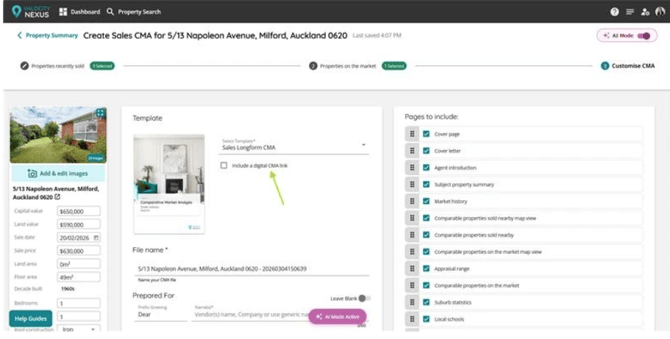
When creating a Sales CMA, users can select the Longform CMA template on the Customise CMA page.
-
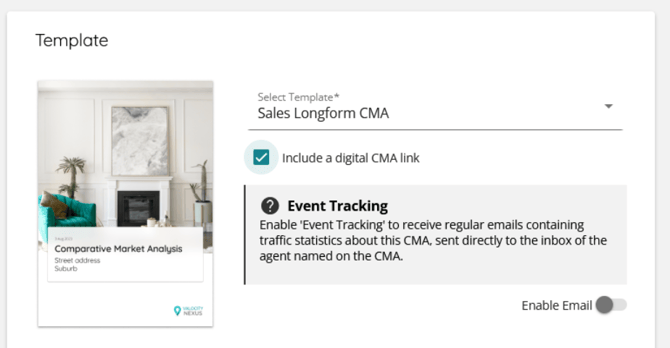
Once selected, an optional checkbox allows users to include a Digital CMA link as part of the same workflow.
-
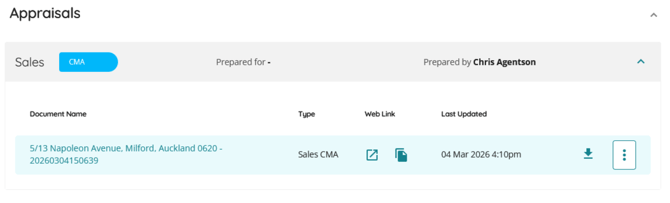
If selected, a Digital CMA link is automatically generated when the CMA is finalised.
-
Users can preview both outputs before finalisation using separate preview options for the PDF CMA and the Digital CMA.
-
Users can still select the Digital CMA template, and this workflow remains functional.
- Digital CMA CMA has not suffered any update and it's l

Why it matters
This streamlines Sales CMA creation by combining Longform PDF and Digital CMA into one workflow. It removes duplicate steps, reduces manual handling, and makes sharing CMAs with customers faster and simpler.
Important: The Digital CMA includes only a subset of the Longform CMA content. Page inserts and page reordering are not reflected in the digital link, and the comparability analysis, subject property commentary, and Commission investment pages are not included.
⭐ CMA Builder: Improved Attribute Editing Messaging
Property attribute editing within CMA has been simplified by replacing the confirmation modal with a clear, non-blocking toast notification. This ensures consistent messaging when editing both Target and Comparable properties without interrupting workflow.
How it works
-
The existing confirmation modal shown when editing property attributes has been removed. When a user edits attributes for either the Target Property or a Comparable Property, a toast notification is displayed instead.
-
The notification informs users that changes apply only to the current CMA and do not update the original property record. The toast appears once per CMA session and does not require user confirmation, allowing users to continue working without disruption.
