
⭐ Create a CMA for properties without an address
Properties without a full address, most commonly those awaiting address assignment, can now be used to create a CMA. Previously, a missing address prevented the CMA from being started.
How it works-
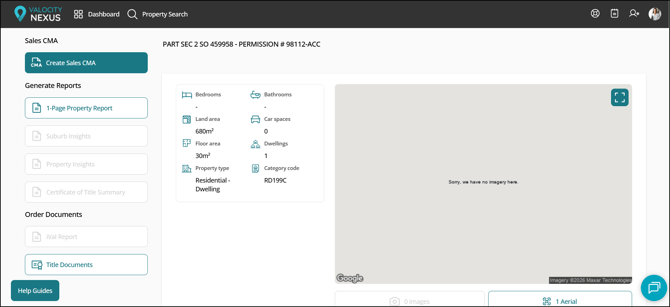
Properties without an address won't be found by an address search. In most cases they can be located by searching the legal description or title number instead, and a CMA started from there as normal.
-
If the property has a location on record (its latitude and longitude coordinates), comparable searching works as usual. Radius search, distance sorting, and the map are all available, even though there's no address.
-
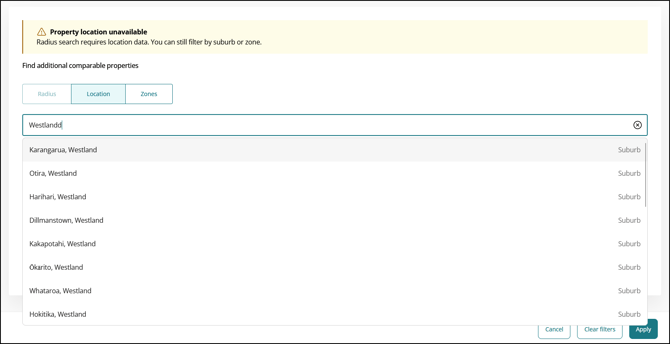
If the property has no location on record, the comparable search filters open rather than running a search automatically, so agents can choose how they'd like to search.
-
Nexus offers the suburb as a starting point, shown as a suggestion such as "Karangarua, Westland".
-
Agents can search by suburb or by street, and add more than one of either. Once the first suburb is added, only suburbs can be added, and the same applies to streets, so the two can't be mixed in a single search.
-
Radius search and distance sorting are unavailable without a location, each with a short explanation, since there's no point on the map to measure out from. The map is hidden rather than showing an inaccurate pin.
-
It's worth checking the filters before clicking the apply button to run a comparable search to make sure they're set as intended.
-
Zone search is another option. Open the Zones tab, then either search for an existing zone under Saved Zones, or create a new one by typing an address or suburb into "Center to an address or suburb" to move the map there, zooming as needed, and drawing the area with the polygon tool.
-
A new zone can be saved with a name for reuse, or left unsaved if it's a one-off. Click Apply to return comparables from within it.
-
Comparables can still be added manually in either scenario, exactly as they are today.
-
The target property address and details such as attributes can be edited in the Target Property Details modal on the Customise CMA step, so agents can add the address themselves if they already know it.
-
Suburb Overview and Suburb Statistics pages on the Sales CMA won't be included in either scenario, as the suburb details needed to generate them aren't available for properties without an address.
-
The comparables map won't be included in the CMA where the property has no location on record, as there's no target property to plot the comparables against.
-
The Local Schools page on the Sales CMA also won't be included where the property has no location on record, as there's no location to find nearby schools from.
Properties without an address are usually new subdivisions and recently issued titles, exactly the ones an agent is most likely to be asked to appraise. Until now they stopped a CMA before it started. Agents can now start from the legal description or title number and find comparables by suburb, street, or a zone they draw themselves. Where a location genuinely isn't available, Nexus switches off the tools that depend on it rather than putting an unreliable distance or map pin in front of a vendor.
⭐ Region-aware map layers
Map layers that aren't available for a region are now hidden, rather than showing as toggles that return nothing.
How it works
-
This applies wherever the Map Layers panel is available, including the search results map view and the property summary map ection.
-
Map layer toggles only appear where data exists for the region being viewed.
-
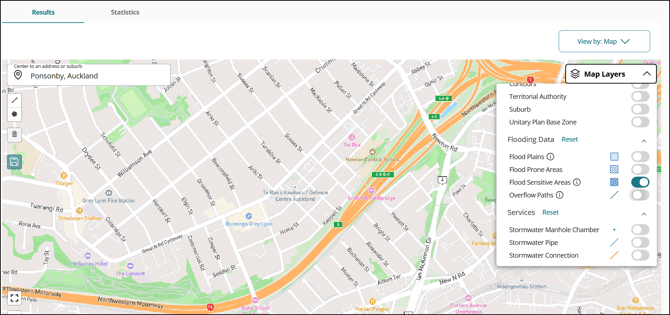
Auckland-specific layers, including Unitary Plan Base Zone and the Flooding Data group (Flood Plains, Flood Prone Areas, Flood Sensitive Areas, and Overflow Paths), now show only when viewing Auckland properties.
-
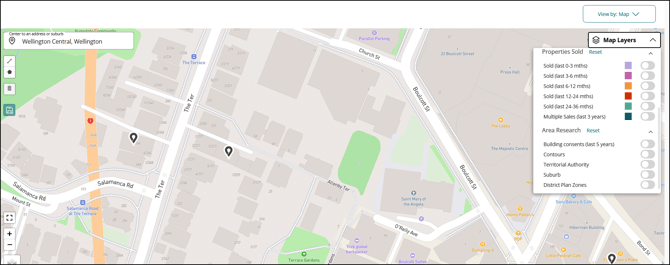
Where every layer in a group is unavailable, the group heading disappears as well, so there are no empty sections left behind.
-
Map Layers available nationally are unaffected and display as they always have.
Why it matters
A toggle that does nothing is worse than no toggle at all. Agents outside Auckland could switch on a flooding layer and see an empty map, with no way to tell whether the data was missing or the property simply wasn't affected. Showing only the layers that carry data removes that doubt.