-1.png?width=200&height=59&name=REIP%20Nexus%20logo%20(2)-1.png)
💡Motivation
Our goal is to enhance the user experience for property searches by making address search more accurate, flexible, and intuitive. The previous search dropdown was limited to 20 suggestions and lacked clear indication of whether a result was a suburb, street, or property making it harder for users to trust their selections. Key inputs such as postcodes, Australian local authorities weren’t supported, limiting the ability to search across entire regions beyond a single suburb.
The improved Address Search directly addresses these gaps by supporting a broader range of inputs, clearly displaying suggestion types, and returning more relevant results — ultimately helping users find the right property faster and with greater confidence.
📌 Overview
The new Address Search experience introduces several enhancements designed to improve accuracy, usability, and speed.
Key changes and enhancements include:
-
New dedicated Address tab – A focused tab for property address search, supporting input types such as street, suburb, postcode, and local authorities.
-
Support for postcode search – Users can view all properties associated with a specific postcode.
-
Support for Local Authority search – We have introduced enhanced functionality that allows users to search for properties within Local Authorities in Australia.
-
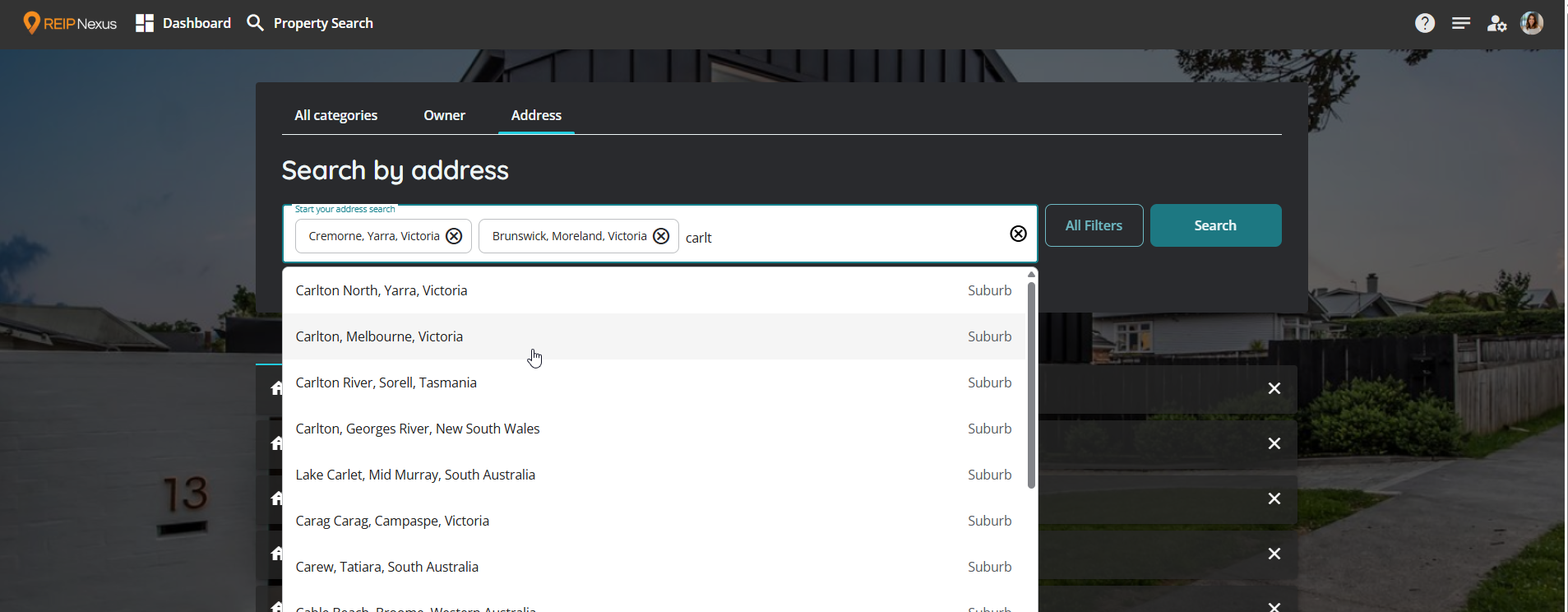
Clearer autocomplete suggestions – Dropdown suggestions results are labeled by type (e.g., Address, Street, Suburb, Postcode) to reduce confusion.
-
Fuzzy search support for partial inputs – Users can enter partial or incomplete search terms, and the suggestions matches them with relevant results, significantly reducing search friction when full details are unknown.
-
Multi-address search support – Users can input a primary address (e.g., 123 Example Street) to search for all associated units. This enhancement significantly improves the discoverability of multi-unit properties, building on the existing functionality available in the universal search tab.
-
Multi-chip search input – Users can now search for and select multiple suburbs, postcodes, streets, or local/territorial authorities directly from the main search bar on the Address tab. Each search term appears as a clearly visible chip for easy management. For example, users can enter "New Brunswick," select it, then continue adding further terms like "Cremone," or "Carlton." After selecting the first chip, the search suggestions will be restricted to the same category. (For instance, if the first selection is a suburb, subsequent suggestions will include only suburbs.)
-
Improved search logic and ranking – Smarter matching prioritises high-confidence and relevant results.
-
Infinite Scroll on the Address Tab – Users can seamlessly scroll to view additional results without encountering a hard limit, enhancing the experience of browsing through extensive result sets.
These updates are part of the broader Nexus Search improvement initiative and are designed to support both internal users and external clients in finding the right property faster and more reliably.
🔧 How It Works
-
Address tab
Use the dedicated Address tab to search for location-based data. -
Supported input types
You can search using:-
Full property addresses (e.g., “123 Example Street”) will take the user directly to the property page
-
Street names
-
Suburbs
-
Postcodes
-
Local Authorities (AU)
-
-
Autocomplete and fuzzy search
-
Suggestions appear dynamically as you type, supporting both complete and partial inputs (e.g., typing "Crem" will suggest "Cremone").
-
Clearly labeled suggestions by type (e.g., Local Authority, Suburb, Street, Property, Postcode, Multi-Address).
-
The most relevant fuzzy-matched suggestions appear at the top.
-
-
Multi-Address Search
-
Looking for all units at a specific property? Simply enter the primary address, like 123 Example Street, into the search bar.
-
At the top of the suggestions, you'll see a Multi-Address (All) option. Click on this to see all the units associated with that address. You'll also see a few individual units listed as Property below it, but these are just a sample, not the complete list.
-
-
Multi-chip support
-
Add multiple values of the same type (e.g., multiple suburbs) in one search
-
Each search term becomes a chip for easy management
-
After the first chip, only results of that same type will appear
-
If there are too many chips, extras are summarised as
+2 moreor+ filtersto keep things tidy
-
-
Infinite scroll
-
Scroll through the dropdown to see more suggestions—no hard limit
-