-1.png?width=200&height=59&name=REIP%20Nexus%20logo%20(2)-1.png)
🌟Search by Legal Description
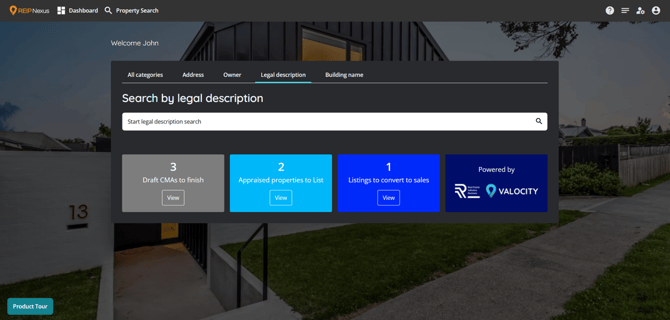
Quickly find the right property with a dedicated Legal Description search. Enter aLegal Description , and get instant autocomplete suggestions with exact matches shown first. This makes property lookups faster, more accurate, and easier to use across Nexus.
How it works?
-
Go to the Legal Description search tab.
-
Start typing a Legal Description in the search bar.
-
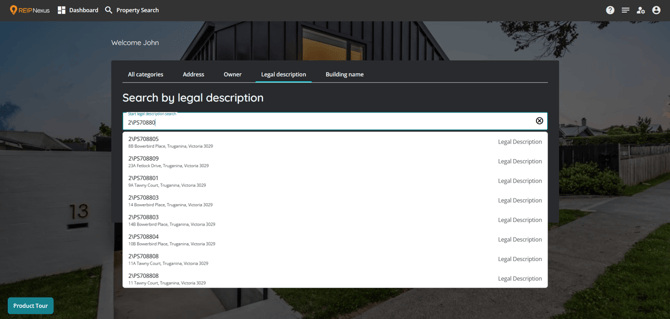
As you type, results appear instantly:
-
Exact matches show first.
-
Suggestions display:
-
Legal description and corresponding address
-
Entering an exact title number or legal description will display the matching property in the suggestion
-
-
-
Click a suggestion to open the Property Summary page.
-
If no results are found, you’ll see “No matches found. Please refine your search.”
Why this matters?
-
Accuracy first – Focused search avoids irrelevant results and helps users find the correct property faster.
-
Efficiency – Instant suggestions save time by reducing the need for full manual entry.
-
Clarity – Key details (Legal description, Address) are shown upfront, so users can select the right match with confidence.
-
User-friendly – Built to be simple and intuitive.
🌟Building Name Search
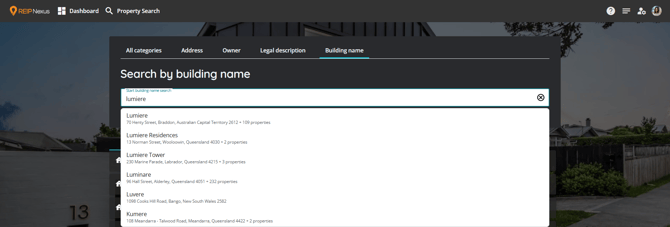
Easily locate the desired property using the specialized Building Name search feature. Simply enter the name of the building you are looking for, and receive instant autocomplete suggestions, prioritizing exact matches along with relevant addresses and the total number of linked properties. This streamlined process enhances the speed, accuracy, and overall user experience for property lookups across Nexus.
How it works?
- Navigate to the Building Name search tab.
-
Start typing a building name in the search bar.
-
As you type, results appear instantly:
-
Exact matches show first.
-
Suggestions display:
-
Building Name, along with the corresponding address and the total number of properties linked to that name, will be displayed if there is more than one. If you enter an exact title number or legal description, the suggestion will show the matching property, provided there are no other buildings in Australia with the same name.
-
Click a suggestion to open the Search result page with all relevant properties.
-
If no results are found, you’ll see “No matches found. Please refine your search.”
-
-
Why this matters?
This feature streamlines property discovery in urban areas where building names are more recognisable than street addresses. By moving it into its own search tab, users gain faster access, a clearer workflow, and more confidence in locating the right property.